AI Tools
PopAi AI PowerPoint Review: Stop Fighting Blank Slides
By GearsClaw Editorial Team | Published July 20, 2026 | Updated July 20, 2026
I used to lose more time to PowerPoint than to the actual meeting.
Not because I had nothing to say. I usually had too much: a PDF, a messy Google Doc, half a dozen bullet points in Notes, and zero energy left for layouts. I’d open a blank deck at 11 p.m., stare at it, and start the same ugly loop. Paste. Reformat. Break the theme. Fix the theme. Repeat.
That’s the pain PopAi actually targets. Not “make prettier fonts.” It’s the grind between raw material and a deck you can still edit.
I started using PopAi because I was tired of rebuilding slides from scratch every week. This is what worked, what didn’t, and who should bother.
Key takeaways
- PopAi is a full presentation workflow: prompt or file in, outline, generate, edit, then export or share.
- AI PowerPoint is the best entry if you live in PPTX and business-style decks.
- The biggest win is structure and first-draft speed, not perfect design on click one.
- Exported PPTX opened in PowerPoint with editable text in testing. That matters more than flashy previews.
- Garbage notes still make garbage slides. Review everything before you present.
The problem wasn’t “I need AI.” It was the blank deck
If you’ve ever turned a 20-page report into slides overnight, you already know the job. The hard part isn’t typing. It’s deciding what belongs on slide 3 versus slide 8, then making it look like a grown-up made it.
Chat tools didn’t save me there. They’d spit out paragraphs. I still had to chop them into slides, pick a template, and fight alignment for an hour. Random PowerPoint templates helped a little, then fell apart the second I changed one text box.
My real blockers looked like this:
I had source material, but no clean narrative order.
I didn’t want to rebuild content I’d already written in a doc or PDF.
I needed something editable for the next stakeholder round, not a pretty screenshot I couldn’t fix.
And I needed it before the meeting, not after three coffee refills and a meltdown over margins.
That’s the bar I used for PopAi. Does it get me from messy input to a usable draft faster, without trapping me in a closed format?
What PopAi actually is
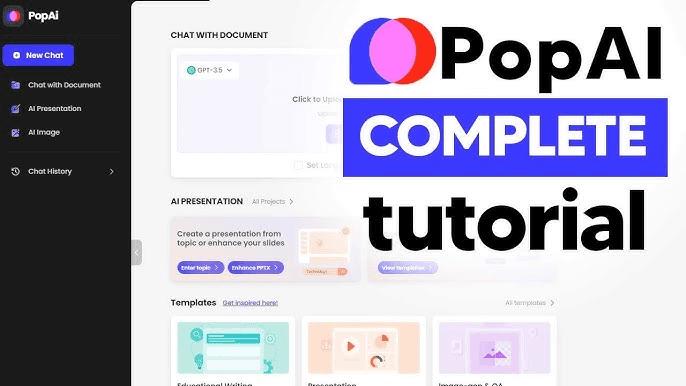
PopAi is an AI presentation workspace. In plain terms: you give it a topic, a prompt, or an existing file, and it helps you organize the content, generate slides, keep editing, then export or share.
That full loop is the difference between a toy and a tool. A lot of AI slide apps stop at “look what we generated.” PopAi is more useful when you treat it like a draft engine inside a normal workday.
The basic flow is straightforward. Enter a topic or upload materials. Shape the outline. Pick a theme or template direction. Generate the deck. Edit text, images, and layout. Export as PPTX or PDF, or share a link.
If all you want is a social-media-looking mock slide, almost anything works. If you need a deck that survives a real review meeting, the edit and export steps are the product.
- Input: topic, prompt, or files
- Structure: outline before design
- Generate: full draft slides
- Finish: edit, export PPTX/PDF, or share
Why AI PowerPoint became my default lane
I spend most of my week in business decks, so I hung out in PopAi AI PowerPoint.
It’s built for people who think in PowerPoint habits: prompts, templates, layout options, and a PPTX you can keep polishing later. That matched how I already work. I don’t need a brand-new universe. I need a faster first draft that still opens in the software my team uses.
In practice, three things sold me.
I could start from a normal sentence like, “Q3 sales review for the retail team. Keep it tight. Cover wins, risks, and next steps.” Instead of a blank canvas, I got a structured starting point.
I could upload material I already had. Reports, docs, notes. Rebuilding the same content by hand was the part I hated most.
After generation, I could still edit and export. In testing, the PPTX opened in Microsoft PowerPoint and the text stayed editable. That’s my non-negotiable. If I can’t own the file afterward, it’s a demo.
PopAi didn’t magically write better strategy for me. It removed the busywork between “I know what this meeting needs” and “I have a deck I can mark up.”
When the other PopAi modes make more sense
AI PowerPoint isn’t the only door.
AI Presentation is the broader idea-to-deck path. Good when you’re starting from a topic and want PopAi to help organize the whole story before slides land.
AI Creative Slides leans more visual and story-driven. I’d point creators there for tutorial breakdowns, product storytelling, or decks where the pages need more visual punch than a standard business template.
My shortcut: business or class deck that needs to end in PPTX? Start with AI PowerPoint. Open-ended prompt-to-presentation flow? AI Presentation. Visual storytelling? Creative Slides. Don’t overthink day one. Pick the lane that matches the job in front of you.
Where it actually saves time
The time save shows up in ugly, specific moments.
You’ve got an idea, but the slide order is mush. PopAi helps force a structure before you waste an hour decorating the wrong story.
You’ve already written the thing in a PDF or Word doc. Turning that into slides manually is pure labor. File-to-slides is the feature people want when they say they’re “drowning in source material.”
You’re on a deadline for a pitch, class presentation, proposal, or weekly business update. You don’t need a masterpiece on pass one. You need a draft you can sharpen.
And you still need an exit ramp. Edit online, export PPTX, export PDF, or share a link. Different meetings need different handoffs.
That’s the useful pitch. Not “AI will replace your job.” More like: stop spending your best focus on formatting leftovers.
Who should use it, and who shouldn’t
If you build decks every week, PopAi is worth a serious look. Marketers, founders, sales folks, analysts, teachers, students in group-project season, consultants who live in client updates. Same pain, different costumes.
It’s especially useful if your starting point is already a document. Class readings, research PDFs, meeting notes, proposals. That’s where the “stop rebuilding content” benefit hits hardest.
Skip the hype if you only make one presentation a year and enjoy designing by hand. Or if you expect AI to invent a strategy you don’t have. It won’t. Weak thinking in, weak slides out.
Also skip it if you refuse to review output. File conversion entrances exist for formats like PDF, Word, Image, HTML, Text, and PPTX. That doesn’t mean every upload converts perfectly. You still own the facts, names, and numbers.
- Good fit: recurring business, class, pitch, and report decks
- Good fit: docs/PDFs that need to become slides fast
- Bad fit: one-off designers who like building from zero
- Bad fit: anyone who won’t fact-check the draft
How I use it on a real deadline
I write the prompt like I’m briefing a sharp intern. Audience, goal, length, tone, must-include points. Or I upload the source file if the content already exists.
Then I check the outline before I fall in love with the design. Bad structure is expensive. Fixing slide 11 later is how you lose an evening.
I pick a template direction that matches the room. Investor update and freshman seminar should not share the same vibe.
Generate. Edit hard. Tighten titles, cut filler, swap weak visuals, fix anything that sounds generic. Export PPTX when I need PowerPoint polish, PDF when I want a locked handout, or a link when speed matters more than file tennis.
I also keep a short prompt swipe file. Same skeleton every time: audience, goal, slide count, required sections. Reusing a good brief is half the speed gain.
The limits nobody should sugarcoat
PopAi won’t replace judgment. If your notes are a mess, the deck will be a mess with nicer boxes.
First drafts can sound generic if your prompt is vague. “Make a presentation about marketing” gets you marketing mush. Tell it who it’s for and what has to land.
Design taste is still yours. AI can get you to a strong draft. You’re still the one deciding whether the story is sharp enough for the room.
And no, it isn’t “just a PPT generator.” That undersells the outline-edit-export loop. It also oversells it if you expected one click and a standing ovation.
Bottom line
I came in sick of blank slides and late-night formatting. PopAi helped because it attacks that exact workflow: prompt or file, structure, draft, edit, export.
For my use case, AI PowerPoint is the practical starting point. Especially when the end goal is an editable business deck, not a one-off visual experiment.
If you’re on the fence, don’t test it with a toy prompt. Use the ugly notes and the real deadline. That’s the only way to know if it earns a spot in your stack.
Frequently Asked Questions
Is PopAi only a PPT generator?▾
No. It’s better described as a presentation workflow tool: start from a topic, prompt, or file, organize content, generate slides, then keep editing, exporting, or sharing.
Can PopAi create PPT slides from files?▾
Yes. The AI Presentation flow includes entrances for PDF, Word, Image, HTML, Text, and PPTX. Always review the output, since conversion quality can vary by file.
Does PopAi support export?▾
Yes. You can export to PPTX and PDF. In testing, PPTX files opened in Microsoft PowerPoint with editable text.
What is PopAi AI PowerPoint best for?▾
Business-style decks, template-driven workflows, and anyone who wants a PPTX they can keep editing in PowerPoint.
Who should use PopAi?▾
People who make presentations often: business teams, students, teachers, creators, and marketers who want faster structure without giving up editability.
Where should I start with PopAi?▾
For a PowerPoint-style path, start at https://www.popai.pro/ai-powerpoint. Use AI Presentation for a broader prompt-to-deck flow, or Creative Slides when you need more visual storytelling.
Can I keep editing after generation?▾
Yes. Generate first, then continue editing content, images, themes, or layout before you export or share.
Is PopAi good for pitch decks and class presentations?▾
Yes. It’s commonly used for pitch, sales, and report decks, plus class presentations and lecture materials. Match the mode to the job.